La vente exclusive est ici. Jusqu'à 75% de réduction sur tous les produits.

Acheter et télécharger

Téléchargez immédiatement après votre achat

Discutez en direct

Promo !

Visio Professional 2021

Ce produit est uniquement disponible en version numérique.

109,99  889,99 

Paiement Sécurisé Par
Catégorie

Partager ce produit :

  • Product information: Visio Professional 2021
  • Manufacturer: Microsoft
  • Status: New license for 1 PC – If you want to multi-buy licenses, contact us on the live chat
  • Delivery: Download Is Available Immediately After Purchase – You will receive a license and key.
  • Lifetime: One Payment Gives You A Lifetime License
  • Language: All languages Are Available
  • Setup: Live Assistance During Setup and Unlimited Help-Desk Support
  • Guarantee: Every purchase is covered by our 100% product satisfaction guarantee. If the MS Office Store team can’t activate your purchase, you will get your money back.


Pourquoi acheter chez nous ?

Téléchargez immédiatement

Acheter et télécharger
Maintenant!

Assurance imbattable

Garantie
Satisfaction

Votre filet de sécurité

Assistance en direct &
24/7 Chat

Achat sécurisé

Le cryptage SSL permet chaque achat est sécurisé.

Assistant d'installation à distance

Service clientèle à portée de clic

Description

Visio Professional 2021 makes it easier than ever for individuals and teams to create and share professional, versatile diagrams that simplify complex information. Visio Professional 2021 includes updated shapes, templates, and styles; enhanced support for team collaboration, including the ability for several people to work on a single diagram at the same time; and the ability to link diagrams to data instantly. Visio Professional 2021 also helps prevent information leakage by enabling Information Rights Management.If you’re upgrading to Visio Professional 2021 from Visio Professional 2019, you’ll still have all the features you’re used to—and you’ll notice a few new ones as well!

New Azure stencils and shapes

We’ve added many more stencils to help you create up-to-date Azure diagrams. You can use these new stencils to build Azure diagrams for network topologies, virtual machine configurations, operations, and more.

New AWS stencils and shapes

We have enabled infrastructure shapes from another major cloud provider: Amazon Web Services (AWS). You can now use stencils with the latest AWS shapes to help you create diagrams.
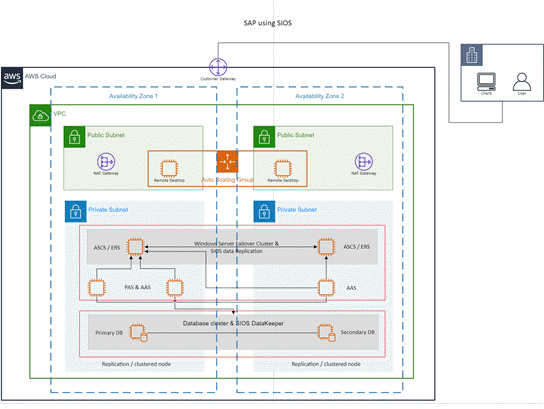
Template for AWS: SAP using SIOS

Content for social distancing planning in the workplace

Many workplaces need to be re-planned to follow the social distancing guidelines in force. This template, and the Workplace Social Distancing stencil, provide a number of shapes, fill patterns and line patterns, both scaled and unscaled, to help with this process.
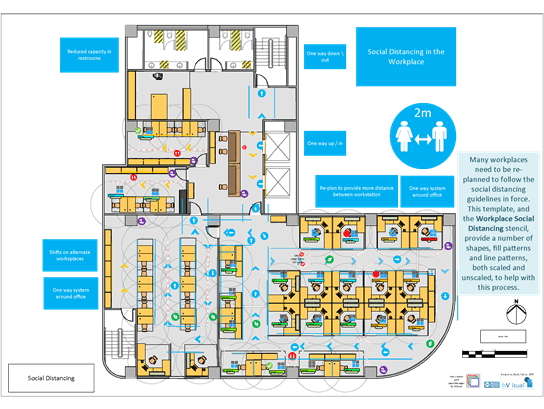
Visio template for a floor plan with social distancing.

Create wireframe diagrams for mobile apps

Bring ideas to life by using a Visio wireframe. A wireframe is a detailed visual model of an interface that is like a blueprint of functionality and content. These new mobile app templates are ideal for creating a low-fidelity, design sketch to present ideas, arriving at a team consensus, and forming the basis of a high-fidelity wireframe.
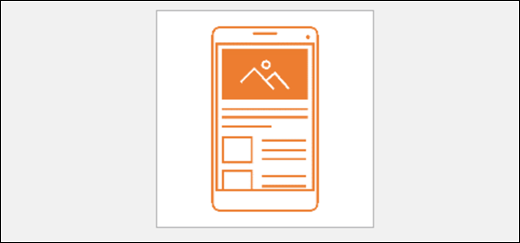
Template for Visio Mobile Wireframe

Visual refresh

Work with a modernized Start experience and newly refreshed tabs in the ribbon.

Experience a clean, clear style with monoline iconography that communicates action and features with simple visuals in Visio.
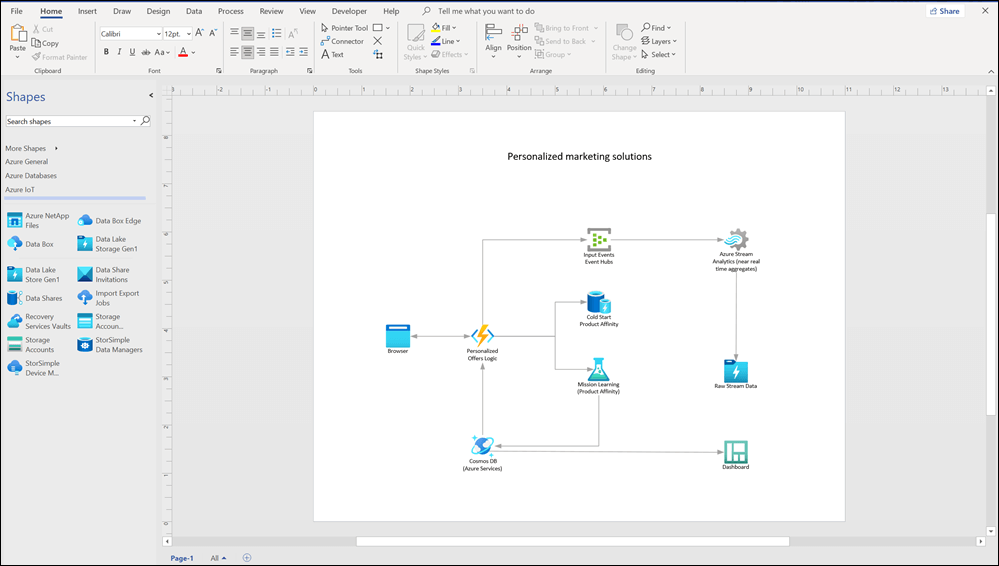
Visio 2021 window with an Azure template and stencils displayed

Content for recreating and redesigning crime scene investigations

Use new Evidence, Indoor, and Outdoor stencils in the Crime Scene Investigation template to recreate crime scenes in detail. Find the template under Maps and Floorplans.
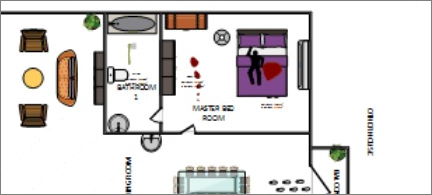
Floorplan

Pick the perfect color

Based on your feedback, we’ve added a new input field in the Colors dialog for Hex color values. Never again will you spend time converting Hex color values into RGB values.

For any property where you can define a color, you can now enter a Hex color value in the Hex box, for example, #0F4C81 or 444.
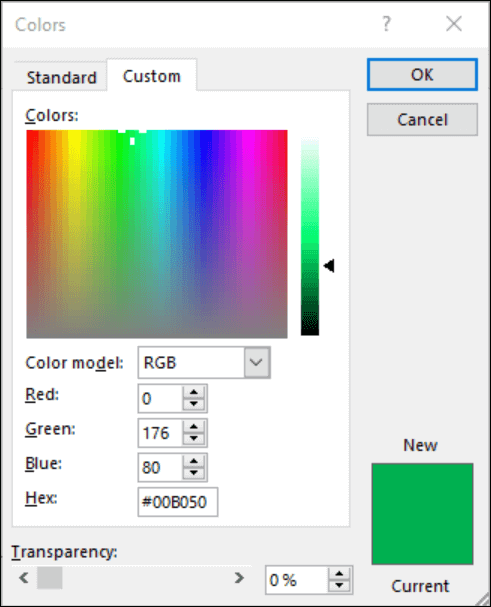
Color picker in Office apps. Under the RGB fields there is a new field to enter Hex color value.

Improved UML and ERD stencils

We’ve continued to make visual and functional improvements to our UML and ERD stencils in this release.

Requirements:


Ce que disent nos utilisateurs

Sabo Masties
Fondateur @ Rolex
"Nos membres sont très impressionnés. Il est intuitif. Il est propre. Il n'y a pas de distraction. Si vous créez une communauté.
Musharof Chowdhury
Fondateur @ Ayro UI
"Nos membres sont très impressionnés. Il est intuitif. Il est propre. Il n'y a pas de distraction. Si vous créez une communauté.
William Smith
Fondateur @ Trorex
"Nos membres sont très impressionnés. Il est intuitif. Il est propre. Il n'y a pas de distraction. Si vous créez une communauté.

Immédiatement après votre achat, vous recevrez un e-mail avec tous les détails nécessaires pour commencer à utiliser le logiciel.

MS Office Store propose une gamme de logiciels, notamment les suites Office et les systèmes d’exploitation Windows.

Vous recevrez vos licences logicielles par e-mail, afin que vous puissiez démarrer rapidement et sans tracas.

Vous pouvez contacter MS Office Store par e-mail et par chat en direct. Nous pouvons vous assister aussi bien dans la résolution de problèmes techniques que lors de l’installation du logiciel.

Oui, nous proposons une assistance à distance pendant le processus d’installation du logiciel en plus de notre support technique.

Des questions? Notre équipe d'assistance n'est qu'à un message !

Auteur/autrice de l’image

De jour comme de nuit, notre équipe d'assistance est là, 24h/24 et 7j/7, pour répondre à vos questions techniques.