La vendita esclusiva è qui. Fino al 75% di sconto su tutti i prodotti.

Acquista e scarica

Da scaricare subito dopo l'acquisto

Chat in diretta

In offerta!

Visio Professional 2021

Questo prodotto viene consegnato solo in formato digitale.

109,99  889,99 

Pagamento garantito da
Categoria

Condividi questo prodotto:

  • Product information: Visio Professional 2021
  • Manufacturer: Microsoft
  • Status: New license for 1 PC – If you want to multi-buy licenses, contact us on the live chat
  • Delivery: Download Is Available Immediately After Purchase – You will receive a license and key.
  • Lifetime: One Payment Gives You A Lifetime License
  • Language: All languages Are Available
  • Setup: Live Assistance During Setup and Unlimited Help-Desk Support
  • Guarantee: Every purchase is covered by our 100% product satisfaction guarantee. If the MS Office Store team can’t activate your purchase, you will get your money back.


Perché acquistare da noi?

Scarica immediatamente

Acquista e scarica
Ora!

Garanzia imbattibile

Soddisfazione
Garantita

La vostra rete di sicurezza

Assistenza in diretta e
Chat 24/7

Acquisto sicuro

La crittografia SSL rende ogni acquisto sicuro.

Assistente di configurazione remota

Servizio clienti sempre disponibile

Descrizione

Visio Professional 2021 makes it easier than ever for individuals and teams to create and share professional, versatile diagrams that simplify complex information. Visio Professional 2021 includes updated shapes, templates, and styles; enhanced support for team collaboration, including the ability for several people to work on a single diagram at the same time; and the ability to link diagrams to data instantly. Visio Professional 2021 also helps prevent information leakage by enabling Information Rights Management.If you’re upgrading to Visio Professional 2021 from Visio Professional 2019, you’ll still have all the features you’re used to—and you’ll notice a few new ones as well!

New Azure stencils and shapes

We’ve added many more stencils to help you create up-to-date Azure diagrams. You can use these new stencils to build Azure diagrams for network topologies, virtual machine configurations, operations, and more.

New AWS stencils and shapes

We have enabled infrastructure shapes from another major cloud provider: Amazon Web Services (AWS). You can now use stencils with the latest AWS shapes to help you create diagrams.
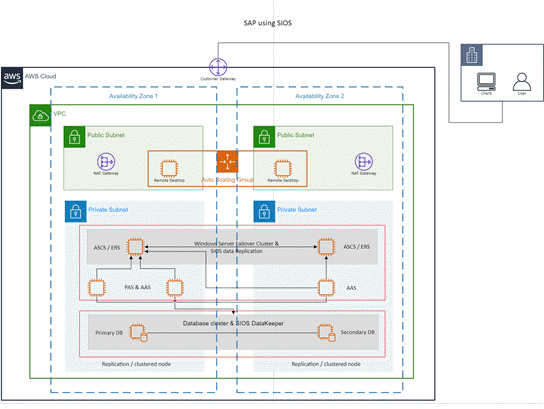
Template for AWS: SAP using SIOS

Content for social distancing planning in the workplace

Many workplaces need to be re-planned to follow the social distancing guidelines in force. This template, and the Workplace Social Distancing stencil, provide a number of shapes, fill patterns and line patterns, both scaled and unscaled, to help with this process.
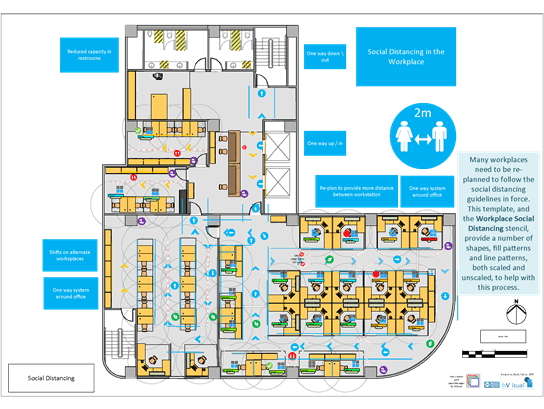
Visio template for a floor plan with social distancing.

Create wireframe diagrams for mobile apps

Bring ideas to life by using a Visio wireframe. A wireframe is a detailed visual model of an interface that is like a blueprint of functionality and content. These new mobile app templates are ideal for creating a low-fidelity, design sketch to present ideas, arriving at a team consensus, and forming the basis of a high-fidelity wireframe.
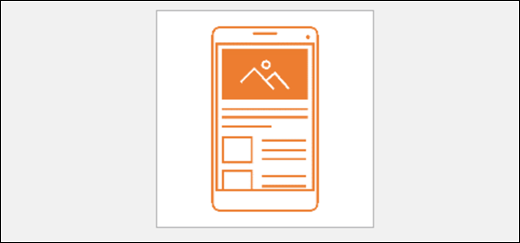
Template for Visio Mobile Wireframe

Visual refresh

Work with a modernized Start experience and newly refreshed tabs in the ribbon.

Experience a clean, clear style with monoline iconography that communicates action and features with simple visuals in Visio.
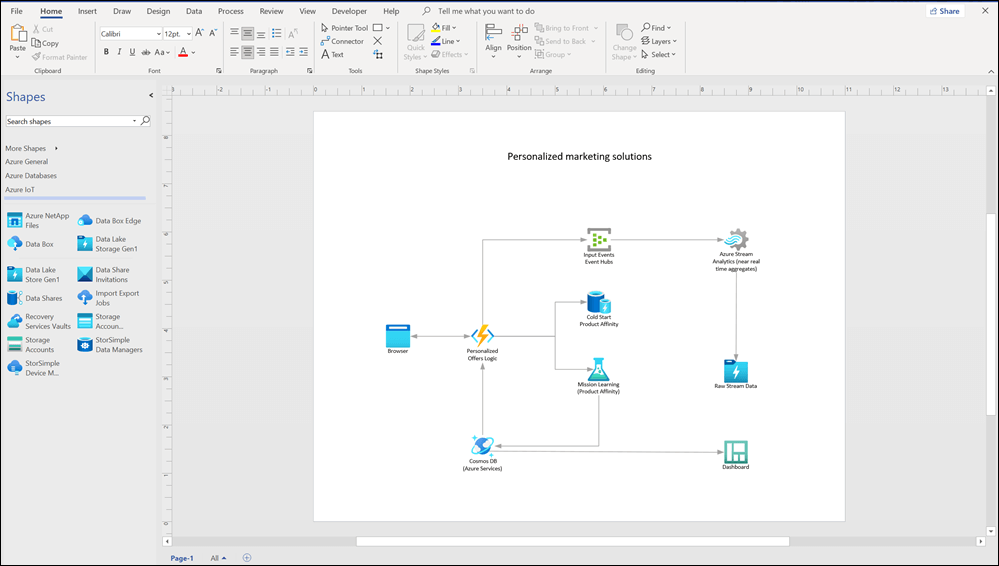
Visio 2021 window with an Azure template and stencils displayed

Content for recreating and redesigning crime scene investigations

Use new Evidence, Indoor, and Outdoor stencils in the Crime Scene Investigation template to recreate crime scenes in detail. Find the template under Maps and Floorplans.
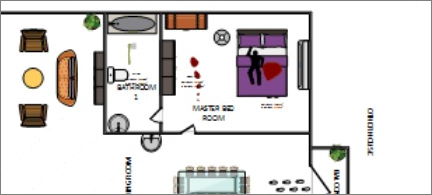
Floorplan

Pick the perfect color

Based on your feedback, we’ve added a new input field in the Colors dialog for Hex color values. Never again will you spend time converting Hex color values into RGB values.

For any property where you can define a color, you can now enter a Hex color value in the Hex box, for example, #0F4C81 or 444.
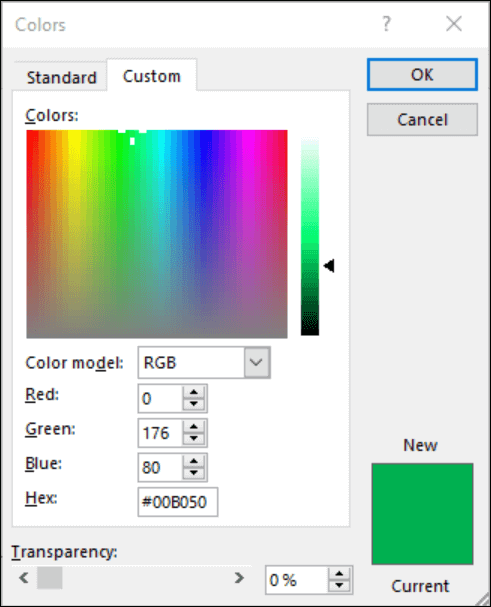
Color picker in Office apps. Under the RGB fields there is a new field to enter Hex color value.

Improved UML and ERD stencils

We’ve continued to make visual and functional improvements to our UML and ERD stencils in this release.

Requirements:


Cosa dicono i nostri utenti

Maschere di Sabo
Founder @ Rolex
“Our members are so impressed. È intuitivo. È pulito. È privo di distrazioni. Se state costruendo una comunità.
Musharof Chowdhury
Founder @ Ayro UI
“Our members are so impressed. È intuitivo. È pulito. È privo di distrazioni. Se state costruendo una comunità.
William Smith
Founder @ Trorex
“Our members are so impressed. È intuitivo. È pulito. È privo di distrazioni. Se state costruendo una comunità.

Subito dopo l’acquisto, riceverete un’e-mail con tutti i dettagli necessari per iniziare a utilizzare il software.

MS Office Store offre una gamma di software, tra cui suite Office e sistemi operativi Windows.

Riceverete le licenze del software via e-mail, in modo da poter iniziare le attività in modo rapido e senza problemi.

È possibile contattare MS Office Store tramite e-mail e live chat. Possiamo assistervi sia nella risoluzione di problemi tecnici che durante l’installazione del software.

Sì, oltre al supporto tecnico offriamo assistenza remota durante il processo di installazione del software.

Domande? Il nostro team di supporto e' a un messaggio di distanza!

Immagine dell'autore

Giorno e notte, il nostro team di assistenza è a disposizione 24 ore su 24, 7 giorni su 7, per rispondere alle vostre domande tecniche.